My Work
ADP, INC.Business
4.2415.00 Reviews
- Version
- 5.06.06.0060
- Installs
- 500.00K
- Age Rating
- Everyone
Screenshots
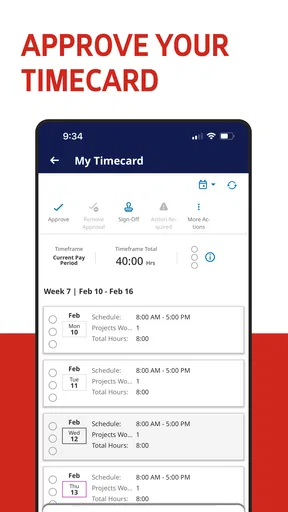
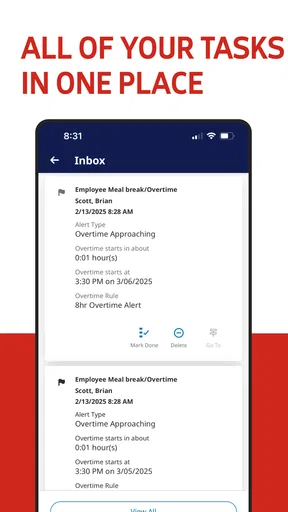
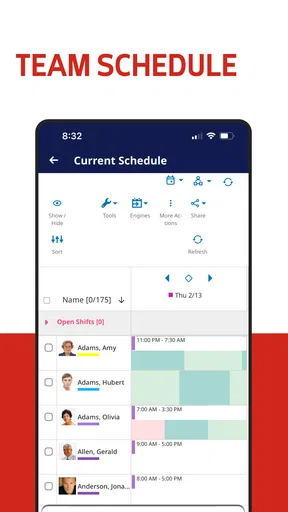
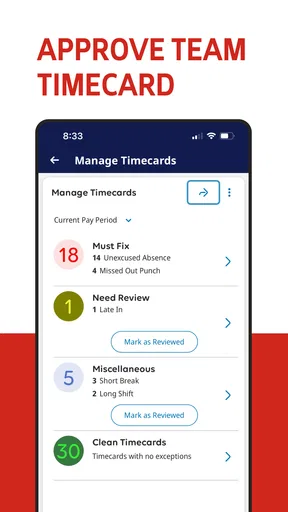
Our Review of My Work
 Analysis by Appyee
My Work is a business app from ADP, INC. that I would describe as a practical companion for employees and managers who need to stay connected with workforce tasks away from a desk. Its focus is not entertainment or general productivity; it sits in the more specific space of workforce management, where quick access and dependable routine matter more than visual flair.
I approached it with that expectation: a tool meant to support working life, not replace every business system a company may use. The app is free, rated for Everyone, and available for devices running Android 8.0 or later. Its store summary presents it as a flexible way to discover workforce management through ADP Workforce Manager, while the short description simply calls it My Work. That simplicity is useful because it sets a clear expectation: this is primarily about reaching work-related information and actions efficiently.
With an average rating of 4.2 from around 3.5 thousand ratings and more than 500 thousand installs, it has enough user activity to feel established rather than experimental. I also found its identity easy to understand: if your employer uses the relevant ADP workplace setup, this app may be useful; if you are looking for a standalone calendar, payroll calculator, or general task manager, it is probably the wrong download.
How My Work feels during everyday use
I find that My Work makes the most sense when I treat it as a quick route to a work task, rather than a place to manage an entire day. Before relying on it for something time-sensitive, I’d identify the few actions I expect to use and check that my workplace account can reach them. That small trial helps separate a useful mobile shortcut from a tool that isn’t configured for my role.
Quick access matters more than visual polish
The first thing I noticed about a workforce app is how much its value depends on the time between opening it and finding the action I need. In this category, a few extra taps can become irritating when repeated before a shift, during a break, or at the end of a long workday. My Work makes more sense when treated as a focused access point rather than a broad office suite.
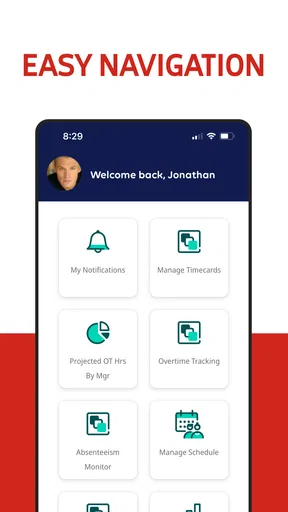
That focus can be a strength. Instead of asking users to move between unrelated tools, the app is built around the “my work” idea: the employee’s relationship with schedules, workplace routines, and management information. I would recommend approaching it with a short list of the actions you perform most often. Once you know where those actions live, the experience should feel more direct than opening a full desktop portal in a mobile browser.
There is also an important expectation to manage. A mobile workforce app can make information easier to reach, but it cannot make an employer’s underlying process simpler than it really is. If a workplace has complicated approval steps or relies on several connected systems, the app may still feel like one part of a larger chain. That is not necessarily a flaw in the mobile interface, but it affects how fast the whole task feels.
What happens during busy periods
The most revealing moments are not quiet checks. They are the busy ones: several employees trying to complete work-related actions around the same time, a manager checking details while moving between locations, or someone opening the app with a weak connection during a shift. These are the situations where a workforce tool earns its place.
I would avoid judging the app only by how quickly its opening screen appears. The more useful question is whether the complete task finishes cleanly. A screen that loads quickly but requires repeated retries is less helpful than a slightly slower screen that preserves progress and gives clear confirmation. For that reason, I would pay attention to whether an action visibly completes before closing the app or switching to another task.
A practical habit is to open My Work a little before an important deadline rather than at the last possible second. That gives the app time to connect and gives you a chance to deal with a sign-in prompt or an unavailable workplace service without creating unnecessary pressure. This is especially relevant for employees whose schedules or attendance routines are tightly timed.
Managers may also experience heavier use than employees. An employee might check one item and leave, while a supervisor could move through several people, dates, or work-related records in one session. That difference matters when deciding whether the app feels light and responsive. My view is that it is best suited to focused, repeated actions rather than long administrative sessions that would be easier to complete on a larger screen.
Stability and recovering from interruptions
Mobile work is rarely uninterrupted. A call arrives, the screen locks, the user moves from Wi-Fi to mobile data, or the operating system pauses the app in the background. A useful workforce tool needs to recover without making the user wonder whether an action was saved.
My advice is simple: after any important submission or update, look for a visible completion state before leaving the screen. This is not a criticism aimed only at My Work; it is a sensible routine for any app connected to workplace records. If the connection changes during an action, reopening the relevant area and checking the current status is safer than assuming the first tap succeeded.
I also would not treat a temporary delay as proof that the app itself is unstable. Business applications often depend on account configuration and services outside the phone. When a page is slow, the cause may be the network, the company’s setup, or the remote system being reached. The practical distinction for users is whether the app explains what happened and lets them recover without repeating an action blindly.
This is where My Work’s narrow purpose helps and limits it at the same time. It avoids the distraction of a general-purpose app, but it also means the experience is closely tied to workplace availability. If your organization has not configured the service for your role, installing the app alone will not turn it into a complete personal work organizer.
Device demands and compatibility
The minimum operating system is Android 8.0, which keeps the app accessible to many older phones while still excluding devices that have not been updated in years. I would not expect a workforce utility like this to need the same hardware as a graphics-heavy game, but older devices can still feel less comfortable when several apps are open or storage is tight.
For a smoother routine, I would keep the phone’s operating system reasonably current within what the device supports, leave enough free storage for normal app updates, and avoid testing an important work action for the first time during a deadline. These are ordinary precautions, but they make more difference with business tools because the consequence of a failed session can be missed information or extra work.
Battery use is another area where expectations should stay realistic. A focused app that is opened briefly should generally fit more easily into a normal workday than a tool that constantly streams content or tracks activity continuously. Still, I would not assume that every workplace workflow has the same demand. Frequent refreshes, poor reception, and repeated sign-in attempts can make any connected app feel heavier than it does during a short check.
The app’s Everyone content rating is reassuring for mixed-age workplaces and shared household devices, but that rating should not be confused with universal suitability. The important question is not whether the app is appropriate in a general content sense; it is whether your employer uses the ADP environment that makes the app useful to you.
Where it beats the usual alternatives
The usual alternative is often a mobile browser pointed at a company portal. A browser can be convenient when you rarely need the service, but it may involve finding the right page, signing in again, and dealing with a layout designed for a larger screen. A dedicated app has a clearer place on the phone and can make repeated access feel more intentional.
Another alternative is relying on email, paper notices, or messages from a supervisor. Those methods may work for occasional updates, but they are less attractive when employees need to check their own work information regularly. My Work is more appropriate when the organization wants people to use a consistent digital route rather than depend on scattered reminders.
On the other hand, a full desktop workforce portal may still be better for complicated administration. Larger screens are more comfortable for comparing multiple records, reviewing detailed information, or handling tasks that require careful editing. I would use the mobile app for quick checks and time-sensitive routine actions, then move to the desktop experience when the task becomes dense.
This is one of the app’s most important trade-offs: convenience does not automatically mean completeness. My Work is strongest as a mobile doorway into work routines, not as a replacement for every workplace system. That distinction helps prevent disappointment and makes it easier to decide when to switch devices.
A realistic workday example
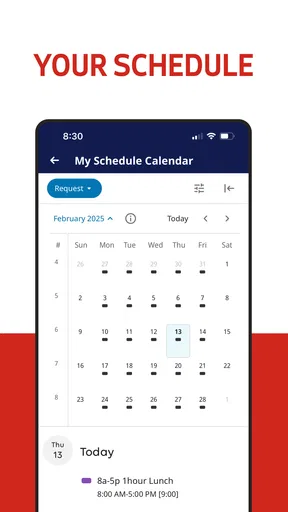
Imagine an employee who is about to start a shift and wants to confirm the day’s work information from a phone. Instead of opening a browser, searching through bookmarks, and adjusting a desktop-oriented page, the employee opens My Work and checks the relevant area. If everything is available, the task is finished before the shift begins.
Later, a manager may need to review a change while away from a desk. The phone is useful because the manager is already carrying it, but the smaller screen becomes a factor if several details must be compared. In that situation, I would use the app to locate the issue or confirm the immediate status, then use a larger device for a more involved review.
That workflow shows why the app can be valuable without being all-encompassing. It reduces the friction of reaching work information at the moment it is needed. It does not remove the need for judgment, a reliable connection, or the correct employer configuration.
Who should use it and who should skip it
I would recommend My Work to employees whose organization already relies on ADP Workforce Manager and who want a more convenient mobile route to their work-related routines. It is also worth considering for managers who need occasional access while moving between locations, provided their responsibilities do not depend mainly on long, detailed sessions.
I would skip it if you need a general personal planner, an independent shift-tracking app, or a tool that works without an employer-linked setup. Downloading a business app without the corresponding workplace access is unlikely to solve anything. I would also choose a desktop portal first if your role involves extensive administration, frequent comparisons, or large amounts of information at once.
Employees sharing a phone with family members should be especially careful about account access and screen visibility. The Everyone rating speaks to content suitability, not to the sensitivity of workplace information. I would use the same basic caution as with any work account: lock the device, avoid leaving a session open, and check that the correct account is active before completing an action.
Version, support expectations, and long-term value
The current version is 5.06.06.0060, and the app was released on July 15, 2019. Those details place it in the category of a maintained business product rather than a brand-new experiment, but the real value still comes from how well it fits your employer’s workflow. Business apps can change in usefulness when an organization changes its configuration, even if the app itself remains familiar.
Because it is free, the main cost is not a purchase price. The cost is attention: learning the route to common actions, keeping the phone ready, and knowing when a browser or desktop is more appropriate. For an employee who checks work information often, that trade can be worthwhile. For someone who rarely needs mobile access, the browser may remain simpler.
My overall performance judgment is positive but deliberately practical. I would not choose My Work because I expect dramatic speed or a rich collection of personal productivity tools. I would choose it because a focused workforce app can remove small points of friction from recurring work routines. Its perceived speed depends on the connection and the organization behind the account, while its usefulness depends even more on whether your role is configured for it.
After using it with that perspective, I see the app as a sensible mobile option for ADP-connected workplaces. It is free, broadly accessible on supported Android devices, and focused enough to make everyday work access less cumbersome. The best results come from using it for short, purposeful sessions, checking completion after important actions, and moving to a larger screen when the task becomes complex.
My final recommendation is therefore conditional but clear: if your employer uses the ADP Workforce Manager environment and you regularly need work information away from a desk, My Work is worth trying. If you need a standalone organizer or a complete administrative replacement, look elsewhere. For the right user, its greatest strength is not spectacle; it is the simple convenience of having a work-focused entry point ready when a browser or desktop would be unnecessarily slow to reach.
Verdict
Strengths of My Work
- Simple interface makes daily task tracking quick and accessible.
- Helps organize work details in one convenient place.
- Useful for reviewing progress and completed activities.
- Can reduce the need for scattered notes and reminders.
- Suitable for both occasional and regular work planning.
Limitations of My Work
- Some advanced features may require a paid plan.
- Initial setup can take time if you have many tasks to add.
- Limited customization may not suit complex workflows.
- Notifications could become distracting when overused.
- Performance may vary on older phones or tablets.
Other Releases by ADP, INC.
View All
ADP Mobile Solutions
Business4.6

myWisely: Mobile Banking
Finance4.3
Similar Picks in This Category
View All
LinkedIn: Community & Network
LinkedIn3.8

Zoom Workplace
zoom.com4.1

Microsoft Teams
Microsoft Corporation4.6

Meta Business Suite
Meta Platforms, Inc.4.6

Webex Meetings
Cisco Systems, Inc.4.5

TeamViewer Remote Control
TeamViewer4.4
Frequently Asked Questions
What is My Work, and what can I use it for?
My Work is a productivity-focused application designed to help users organize tasks, manage work-related activities, and keep important project information in one place. Depending on the version and available features, it may support task lists, notes, reminders, schedules, or progress tracking. It can be useful for personal planning, freelance work, team coordination, or keeping daily responsibilities organized.
Is My Work suitable for beginners and professional users?
Yes, My Work is generally designed to be accessible to both beginners and experienced users. Its main functions are usually straightforward, allowing new users to create tasks, organize information, and review progress without extensive setup. More experienced users may appreciate additional organization options, recurring activities, or workflow tools. However, the overall usefulness depends on the features included in the specific app version.
Does My Work require an internet connection to function?
Some functions in My Work may work without an internet connection, particularly basic task creation, note-taking, or viewing information already stored on the device. Internet access may still be required for account login, synchronization between devices, cloud backups, updates, or collaboration features. Before relying on the app for important work, check which features remain available offline and whether your data syncs correctly afterward.
Is my personal and work information safe in My Work?
My Work may handle information such as tasks, notes, schedules, account details, or other work-related data, so privacy should be considered before using it for sensitive material. Review the app’s privacy policy, permissions, storage practices, and available security options. Avoid entering confidential business information unless you understand how the data is collected, stored, synchronized, and shared.
Is My Work free to download, and are there additional costs?
My Work may be available as a free download, but certain features can depend on the app’s pricing model. Some versions include advertisements, optional in-app purchases, premium tools, subscriptions, or limits on storage and synchronization. Check the Google Play Store or Apple App Store listing before downloading to confirm the current price, supported devices, subscription terms, and whether cancellation is required to stop recurring charges.
